Start Your Audio Journey Now

Capture Speech from Mic, Apps & Media Files in Real Time

Whether it's transcribe audio/video files, microphone audio, or real-time transcribe apps, Audio Note will transcribe to text exactly for you locally.

UserUserUserUserUser

10K+ people are using it

50+Languages
10K+Users
4.8/5Rating
Support languages
Capabilities

Four ways to turn audio into usable notes

Start from files, live audio, links, and automation, then move from capture to transcript to notes in one steady workflow.

01

Prepared media

File transcription

Drop local audio or video, keep the transcription settings visible, and let the local engine produce an editable note.

Audio / videoLocal WhisperParameter preset
03

Online media

Link transcription

Paste a supported video link, download the media locally, and generate a transcript with task history.

1000+ platformsAuto downloadHistory
02

Live audio

Realtime transcription

Capture microphone, application audio, or system audio and turn the stream into saved captions.

MicrophoneApp audioSystem audio
04

Automation

Watch folder

Monitor a folder continuously. New recordings are detected, queued, transcribed, and archived.

Auto detectQueueBatch export
01 · File transcription

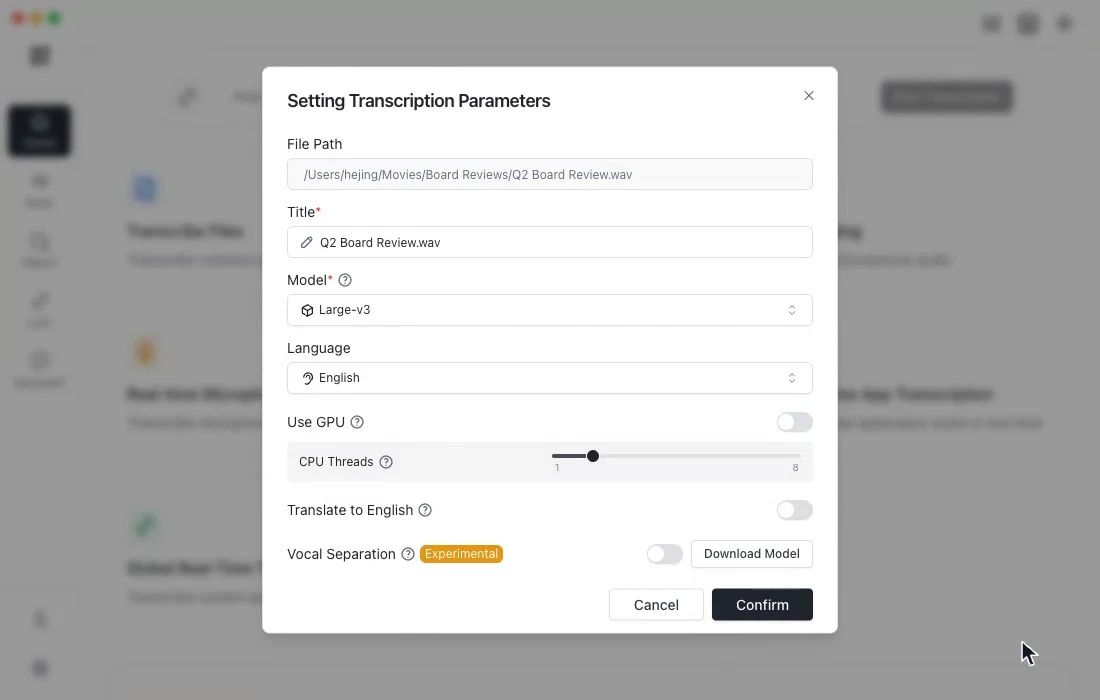
Pick a local audio file, get a timestamped transcript in one click

Everything runs locally — no uploads, no waiting. Supports common audio and video formats with auto language detection and editable, exportable transcripts.

  • Supports MP3 / MP4 / WAV / M4A and 30+ formats
  • Local Whisper engine — your data never leaves the device
  • Auto language detection & per-sentence timestamps
  • Built-in device performance recommendations for lighter or higher-accuracy models
  • Offline transcription and bilingual translation for Chinese, English, Japanese, Korean, Russian, and more
  • Export to SRT / VTT / Markdown / TXT / JSON and more
Local Engine

product-interview.mp4

1 min · English · Whisper Large-v3

Transcribing...0%

The transcription flow starts automatically when this panel is visible

02 · Realtime transcription

Realtime transcription

Realtime mode covers microphone capture and app audio capture. The demo starts the stream, reveals captions, and saves the session automatically.

  • Realtime microphone transcription for meetings, interviews, and lectures
  • Realtime app transcription for meeting apps, browsers, and media players
  • Global realtime transcription with a lightweight always-on subtitle window
  • Realtime translation with bilingual text generated during capture
  • Multiple transcription engines: Whisper, Sherpa, and ML Engine
  • Device performance recommendations plus VAD and GPU tuning for stable live capture

Realtime transcription

Live captions

Model
Whisper / Sherpa
Language
Auto detect
Source
Mic / App / Global
Scene
Meeting tuned
Ready to capture
LIVEMicrophone · App audio · System audio

Live captions start streaming automatically when this panel is visible

Realtime caption flow
03 · Link transcription

From a pasted link to a transcript without extra choices.

The URL is already prepared. The demo simulates source detection, local download, transcription, and result review automatically.

  • Paste YouTube, Bilibili, TikTok, and other media links for source detection
  • Download audio automatically and push it into the transcription queue
  • Keep task status, source platform, and transcript result in one list
  • History, retry, and batch link workflows stay available after completion
https://video.example.com/watch/product-demo
Link task flow
YouTubeBilibiliTwitter/XTikTok + 1000+
Running Tasks
History Tasks
ReadyWeekly launch sync livestream
YouTube · 53:00
Ready
WaitingFeature walkthrough with support examples
Bilibili · 23:58
Waiting
WaitingCustomer call highlights
YouTube · 21:00
Waiting
WaitingShort product teaser with subtitles
TikTok · 03:08
Waiting
04 · Watch folder

Keep a folder under watch and let new media flow in.

The folder monitor turns recurring recording workflows into a queue. The demo reveals the automatic path when it enters view.

  • Keep a recording folder under watch and enqueue new media automatically
  • Built for recurring workflows like meetings, podcasts, and research clips
  • Background transcription writes results into history without manual import
  • Queue review, completed runs, and downstream processing stay in one place

Watched Folders

New file detected

Folder watch flow
Meeting RecordingsIdle
Podcast DraftsIdle
Research ClipsIdle

Active Queue

board-review-2026-05-08.m4aReady

Meeting recording · 12 min

creator-podcast-draft.wavWaiting

Podcast draft · 38 min

field-research-clip.mp3Waiting

Research clip · 06 min

Recent Runs

board-review-2026-05-08.m4a

Meeting recording · 12 min

creator-podcast-draft.wav

Podcast draft · 38 min

F.A.Q

Frequently Asked Questions

These are the product questions people ask before they start using Audio Note.

Still deciding on a workflow? Talk to us directly.

Audio Note Desktop

Bring realtime transcription into your daily workflow

From meetings and classes to long-form media, use Audio Note to capture, transcribe, translate, and export locally.

RealtimeLocal-firstMulti-engine
Download Free
Available onmacOSWindows
NAudio Note
Whisper-Powered Live Transcription: Capture Speech from Mic, Apps & Media Files in Real Time

Link

Legal

Contact us

Email
Copyright © 2026. Made by AudioNote, All rights reserved.